
When creating or editing a feed source in WP RSS Aggregator v4 on WordPress 6.9 or later, you may encounter the following messages:
-
Under the feed URL:
undefined -
In the Feed Preview panel:
No items to be previewed. Kindly ensure that this is a valid feed or try using the Force Feed option below.
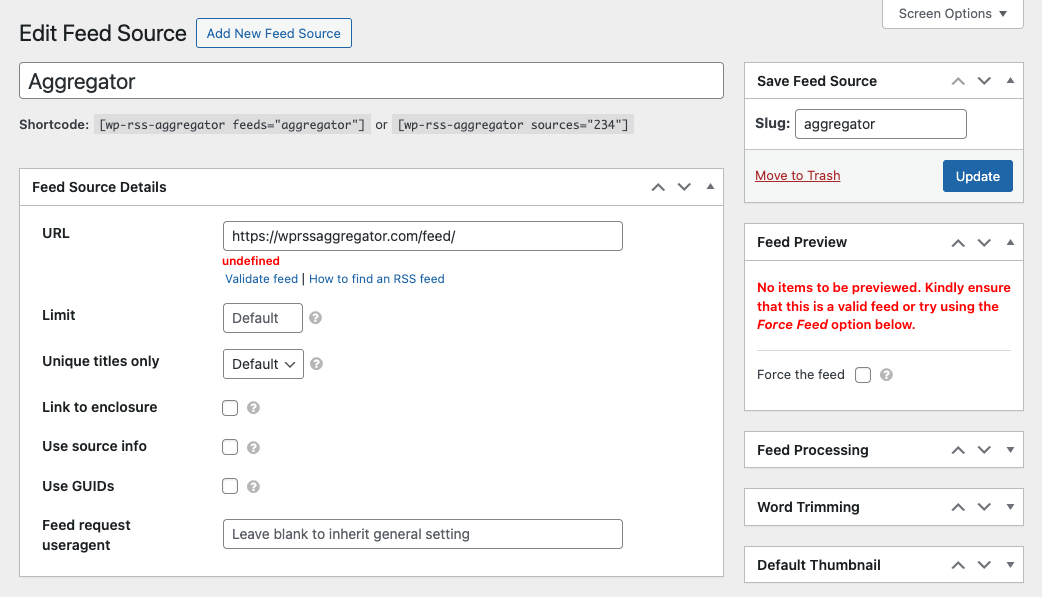
Despite these notices:
- You can still save or update the feed source.
- The feed will continue importing items as expected in the background.
To verify the feed is working:
- Go to RSS Aggregator > Feed Sources.
- Locate your feed source.
- Click the Fetch button to manually trigger an import.
You can safely ignore the warning, as it is a visual issue only and does not affect the feed importing functionality. The feed will continue importing items without any issues.
If you do experience any issues with importing, feel free to reach out to our support team for help.

