
Seeing a “WordPress cron is disabled on this site” notice in your dashboard? Jump straight to What to do when WordPress cron is disabled.
Aggregator relies on WordPress cron to import new items from your sources on schedule. This guide explains how WordPress cron works, its limitations, how to check that it is running, and what to do if it has been disabled on your site.
Configuring the Update Strategy Cron in Aggregator
With Aggregator, you can configure how frequently the plugin checks and fetches new content for each source using the Update Strategy feature. You have the flexibility to set custom intervals such as every 15 minutes, hourly, or any other custom frequency that suits your needs, in minutes, hours, days, weeks, or months. These are the cron intervals.

While this is a powerful feature, it’s important to understand how WordPress cron works, as it determines when these updates happen and what might cause them to get stuck or stop entirely.
What is Cron?
Cron is a task scheduler that allows you to schedule actions like running scripts or executing commands at specific times without your manual intervention. For example, you could schedule a task to run every day at midnight to back up your website data – that’s a cron job.
This automation reduces manual tasks and ensures that important actions, such as content updates or database cleanups, happen at the right time and on a regular basis.
What is WordPress Cron?
WordPress has its own version of cron, often referred to as WP-Cron. Unlike traditional cron systems, which run based on server time, WordPress Cron works differently due to the variety of hosting environments WordPress can be installed on. WP-Cron runs based on visits to your site. Here’s how it works:
- A visitor arrives on any page of your WordPress site.
- WordPress checks to see if any scheduled tasks (cron jobs) need to be run.
- If a task is due, WP-Cron triggers it to run.
WP-Cron is just a PHP file, wp-cron.php, in the root of your WordPress installation. Normally WordPress calls it for you on page visits, but it can also be called directly by a real server cron job. That is the basis of the more reliable setup described later in this guide.
How Does WP-Cron Affect Aggregator?
When you set a source to update every 15 minutes, WP-Cron is responsible for ensuring that this update happens. However, WP-Cron’s reliance on site visitors means that if your website has low (or no) traffic, tasks like fetching new items from a source might not run as scheduled. In other words, if no one visits your website for hours, WP-Cron will not trigger, and the feed updates will not occur during that time.
Common Issues with WP-Cron
1. Stuck Cron Jobs
One of the most common problems users face with Aggregator is that the cron jobs responsible for fetching new items get “stuck.” This happens when WP-Cron isn’t running as expected, and scheduled updates fail to occur.
2. Cron Job Delays
As WP-Cron relies on visitors, websites with low traffic may experience delays in cron job execution. If your site is new or has irregular traffic, your sources may not update as frequently as you’d like.
3. WP-Cron is Disabled
WordPress lets site owners and hosts switch off visitor-triggered WP-Cron entirely by adding this line to wp-config.php:
define( 'DISABLE_WP_CRON', true );This is usually done on purpose, so that a real server cron job can take over (see Setting up a server cron job). But if WP-Cron is disabled and nothing has taken over, scheduled tasks stop running altogether and Aggregator will not import anything automatically until it is fixed.
Aggregator detects this configuration and shows a notice in your dashboard. The next section explains what to do about it.
What to do when WordPress cron is disabled
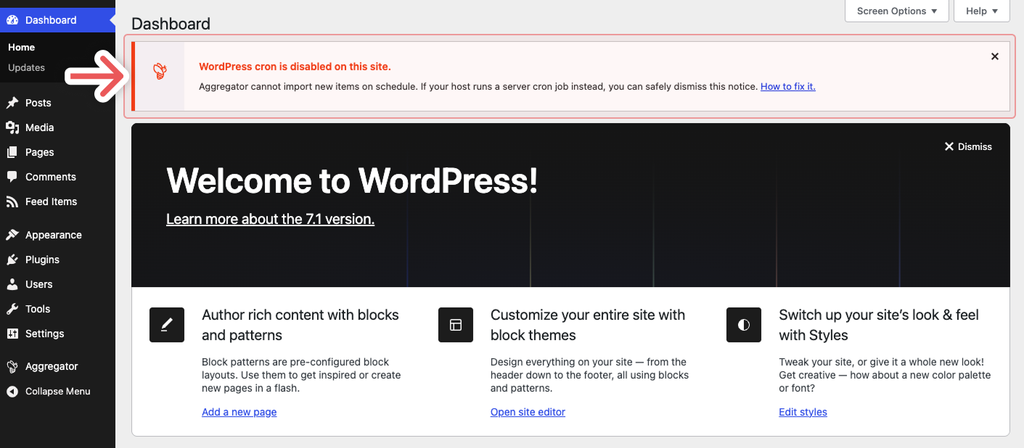
If DISABLE_WP_CRON is set to true on your site, Aggregator shows a notice in two places. On your WordPress admin screens (Dashboard, Posts, Plugins, and so on) it looks like this:
And in Aggregator › Hub it appears as a compact bar at the top of the page:
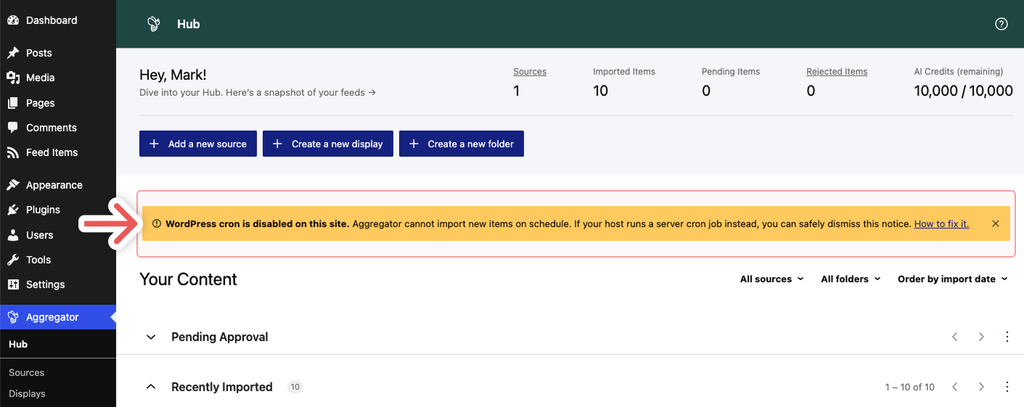
Both notices say the same thing, and dismissing one also dismisses the other (see About dismissing the notice below).
The notice does not necessarily mean something is broken. Many managed hosts disable WP-Cron deliberately and run a server-level cron job in its place, which is actually the most reliable setup. What matters is whether something is still triggering your scheduled tasks.
Step 1: Check whether a server cron job is already running
Any one of these will tell you:
- Look at your sources in Aggregator. If your sources are still importing new items on their usual schedule, a server cron is already doing the work and you can skip to Step 2.
- Use WP Crontrol. Install the free WP Crontrol plugin and go to
Tools > Cron Events. WP Crontrol will tell you directly ifDISABLE_WP_CRONis set. If events listed there keep showing as overdue (a status of “Now” for events scheduled in the past), nothing is running them. - Ask your hosting provider. Tell them WP-Cron is disabled on your site and ask whether they run a server cron job that calls
wp-cron.php. Most managed hosts will know immediately.
Step 2: Take action
If a server cron job is already running – you’re all set. Dismiss the notice using the close (×) button and Aggregator will continue importing as scheduled.
If nothing is running your scheduled tasks – pick one of the following:
- Set up a server cron job (recommended). This is the most reliable option and lets you leave
DISABLE_WP_CRONin place. See Setting up a server cron job below. - Use an online cron service. If your host doesn’t offer cron jobs, an external service can call
wp-cron.phpfor you. See Alternative: Use an Online Cron Service. - Re-enable WP-Cron. Remove the
DISABLE_WP_CRONline fromwp-config.php(or changetruetofalse). This brings back visitor-triggered cron, with all the limitations described above. If you didn’t add this line yourself, check with your host before removing it – some hosts manage it through their control panel or a must-use plugin, and may have disabled WP-Cron for a reason.
About dismissing the notice
- The notice is shown to each user who has access to Aggregator, and each user dismisses it for themselves. If another administrator logs in, they will see it until they dismiss it too.
- Dismissing it in one place hides it in both: closing it on a WordPress admin screen also removes it from Aggregator › Hub, and vice versa.
- Once dismissed, it does not come back for that user.
- The notice only checks whether
DISABLE_WP_CRONis set. It cannot tell whether a server cron job is actually running, so always confirm that yourself using Step 1 before dismissing it.
How to Check if WP-Cron is Working Properly
If you suspect that WP-Cron is not functioning correctly, you can use a free plugin called WP Crontrol. This tool allows you to view, manage, and troubleshoot WordPress cron events. Here’s how to use it:
- Install the WP Crontrol plugin from the WordPress.org repository.
- Go to
Tools > Cron Eventsin your WordPress dashboard. - Review the list of scheduled cron jobs.
If you see a list of events scheduled in the past with a status of “Now,” it indicates that your cron jobs are stuck. WP Crontrol will also warn you at the top of the page if DISABLE_WP_CRON is set on your site.
Troubleshooting Stuck Cron Jobs
The most effective way to resolve stuck cron jobs is to contact your hosting provider. Explain the issue and provide them with details about how WP-Cron operates. Your host should be able to help resolve the problem, often by adjusting server resources or configuring a server-level cron job (which is the most reliable).
Setting up a server cron job
If you want to ensure that scheduled tasks run on time regardless of site traffic, set up a server cron job that calls wp-cron.php directly. This triggers your cron jobs at the interval you set, without relying on site visitors.
The simplest route is to ask your hosting provider to set this up for you. Most reliable hosts offer this option and will implement it themselves.
If you have access to your server’s crontab (or a “Cron Jobs” tool in cPanel, Plesk, or your hosting panel), the job looks like this, replacing example.com with your own domain:
*/5 * * * * curl -s https://example.com/wp-cron.php > /dev/null 2>&1Or, if WP-CLI is available on your server:
*/5 * * * * cd /path/to/wordpress && wp cron event run --due-now > /dev/null 2>&1A few things to keep in mind:
- Run the cron job at least as often as your shortest Update Strategy interval. If a source is set to update every 15 minutes, a cron job that runs every 5 minutes is a good choice.
- Once the server cron job is in place, disable visitor-triggered WP-Cron by adding the
DISABLE_WP_CRONline shown earlier towp-config.php. This stops WordPress from also trying to trigger cron on every page visit, which keeps page loads faster. - After doing so, Aggregator will show the “WordPress cron is disabled” notice. This is expected, and you can safely dismiss it.
For more detail, including instructions for Windows servers, see the official WordPress guide: Hooking WP-Cron Into the System Task Scheduler.
Alternative: Use an Online Cron Service
If your hosting provider doesn’t offer cron job support or you prefer a simpler setup, you can use an online cron service. These services will trigger the WP-Cron process by sending a request to wp-cron.php at specified intervals.
One popular service for this purpose is EasyCron, which provides a guide specifically for Aggregator users, detailing how to set up a reliable cron schedule.
