
The Title settings under Source › Advanced › Title let you add your own text before or after the title of every post imported from a source. It’s a handy way to label where a post came from, for example “News:” at the start of each title, or the source’s name at the end.
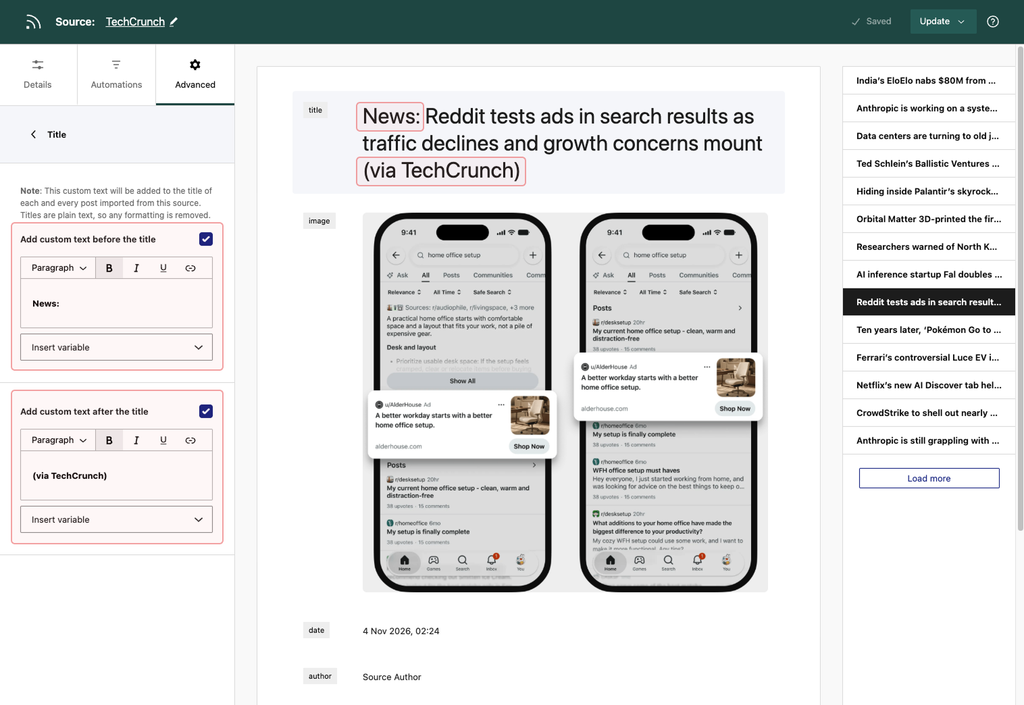
Add Custom Text Before the Title
Turn on Add custom text before the title and type the text you’d like to appear at the start of each title. For example, if you enter News:, a post titled “Apple Announces New iPad” will be imported as “News: Apple Announces New iPad”.
Add Custom Text After the Title
Turn on Add custom text after the title and type the text you’d like to appear at the end of each title. For example, (via TechCrunch) would turn the title above into “Apple Announces New iPad (via TechCrunch)”.
You can use both options together. There’s no need to add a space between your text and the title, as Aggregator adds one for you.
Using Dynamic Variables
Instead of typing fixed text, you can pick a dynamic variable from the Insert variable dropdown below each field. Aggregator replaces it with the right value for each post when it’s imported. Here’s what each one adds:
- Source name: Displays the name of the source from which the content was imported.
- Source URL: Displays the URL of the source.
- Post title: Displays the title of the imported post.
- Post URL: Displays the URL of the imported post on your site.
- Original Post URL: Displays the URL of the original post.
- Post date: Displays the original publication date of the post.
- Import date: Displays the date when the content was imported.
- Author name: Displays the name of the author of the post.
- Author URL: Displays the URL of the author’s page or profile.
- Featured Image URL: Displays the URL of the featured image of the post.
- Post meta: Displays any custom post metadata.
Good to Know
- Titles are plain text: Any formatting, such as bold text or links, is removed, because WordPress titles can’t contain formatting.
- It applies to new imports: The text is added to the post title when the post is imported, so it also shows anywhere your theme lists titles, like archives, widgets, and your site’s RSS feed. Posts you’ve already imported keep their current titles.
- It works with AI Rewriting: If the source rewrites titles with AI, your custom text is added to the rewritten title.
- Check the preview: The source preview shows your custom text around each title, so you can see the result before you save.
Note:
Want to add text to the post content instead? See Custom Text.
